For a Woman Who Loves Tech (It’s in my job title, so I really couldn’t lie on my CV about that one), I’ve rarely met a device I didn’t, well, love. Fitness tracker? I’m here for it. Hair straightener that retails for close to four figures? I’ll take two. A beauty wand that promises to transform me into JLo quicker than a Bennifer re-marriage? Sign. Me. Up.
Buying a new laptop, though, always seems to fall lower on the priority list. It’s not that I don’t use one (I’m considering making mine next of kin). But all those specs overwhelm me. And come every EOFY they make actually getting the purchase done in time to write it off on tax that much harder.
If you’ve shopped for a laptop lately, you’ll know the challenge. Even the naming conventions have gotten… a lot.
Last I checked (and I’m showing my age here), the brand I knew as Hewlett Packard was still using the Envy and Pavilion names. However, it turns out they’ve quietly replaced them with “OmniBook” – HP’s new umbrella term for its mainstream-to-premium laptop range.
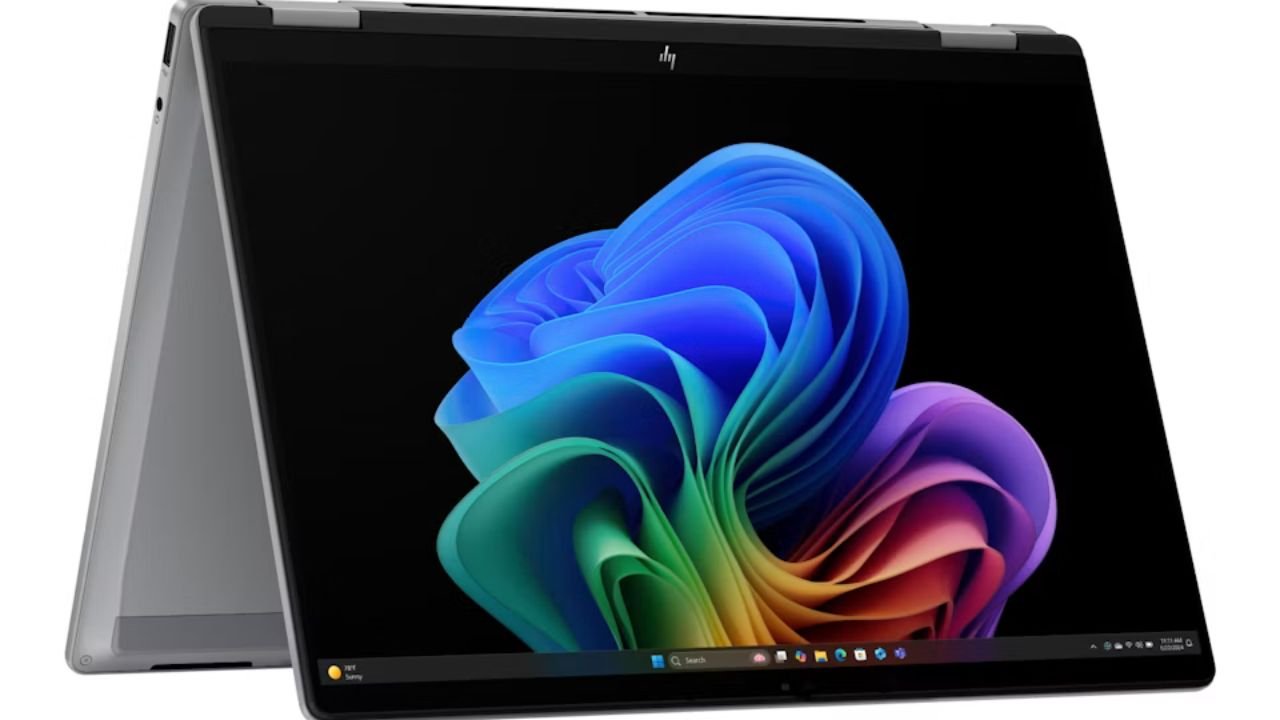
And, sitting near the top of that range is the one I ended up bringing home: the HP OmniBook X Flip 14, a 14-inch, 2-in-1 convertible from HP’s more elevated, AI-focused tier. Priced at $2,598, it’s not a small investment – but here’s what actually won me over, minus the spec-sheet headache.
The Flip Factor
Thanks to a 360-degree hinge, this laptop bends into four different modes: your normal laptop setup, a tent mode where it props itself up like a little easel, a reverse mode for showing someone across the table what’s on your screen, and a full flat tablet mode.
I put this to the test on a Sunday when I was meant to be making banana bread and instead spent 20 minutes googling substitutes for the buttermilk I didn’t have. Tent mode meant I could prop the laptop up on the bench, recipe on screen, hands covered in flour, without touching the keyboard once. Later that week, a courier needed a signature and I flipped it flat into tablet mode and signed with my finger like it was the most normal thing in the world.
The screen itself is genuinely gorgeous while you’re doing all this – OLED, so blacks are properly black and colours pop, and it’s smooth enough (thanks to a 120Hz refresh rate) that scrolling and swiping feels buttery rather than laggy. I noticed it most while scrolling through holiday photos with my sister over FaceTime – she actually asked what laptop I was using, which has never once happened to me before.
So, How Does the “AI” Actually Work?
Every laptop seems to be shouting “AI!” at us right now, so let’s cut through it. This one’s badged as a Copilot+ PC, which in plain English means it has a dedicated AI chip built in (HP calls it an NPU) that handles AI tasks on the laptop itself, rather than sending everything off to the cloud to be processed somewhere else.
A few moments where that actually showed up for me, not on a spec sheet:
On a call from a loud cafe – toddler meltdown two tables over, espresso machine going nonstop – the background noise reduction stripped it all out in real time on my end. My colleagues said it sounded like I was in a silent room. I could see it working live in a little audio indicator while chaos happened around me.
Framing myself on video calls without thinking about it – the auto-framing feature kept me centred in frame even when I leaned over to grab my coffee or shifted my laptop angle halfway through a meeting. I didn’t have to manually adjust the camera once, which is the small thing I usually forget to do until someone points it out.
Searching my camera roll like I’d search Google – 4,182 unsorted photos, no folders. I typed “dog running on sand” and got the exact photo in seconds. A few days later I searched “receipt from the hardware store” for a warranty claim, and it found that too, buried among screenshots. No filenames, no dates, no tags – just describing what I remembered seeing.
Live captions and translation on the fly – I had a family video call where my aunt speaks mostly Lebanese, and the live captions translated in real time on screen, no third-party app, no fumbling for Google Translate on my phone mid-conversation.
Cocreator for a quick birthday card – my nephew wanted a “dinosaur riding a skateboard” for a card I was making in Paint, and the AI image tool sketched it out from a rough scribble in a few seconds, refining it as I adjusted the prompt. Genuinely faster than finding a stock image and painfully unqualified as I am at drawing unicorns myself.
None of this needed a settings menu deep-dive or any understanding of what an NPU actually does. That’s the real selling point – it’s not a feature you go looking for, it’s just quietly doing work in the background so you don’t have to.
Battery That Actually Keeps Up
This is the feature that sounds the most boring on a spec sheet and matters the most in real life. HP’s promise is all-day battery life with fast charging. And after a full week of testing that on purpose – no charger in the bag, just to see – it held up through a genuine work day of video calls, writing, way too many browser tabs, and streaming a show on the train home.
The fast charge actually changed a habit for me. One morning I completely forgot to charge it overnight, so I plugged it in for about 15 minutes while I made a green tea and got ready – and it gave me enough juice to get through my morning meetings without hunting for a power point that already had another cord plugged in
Privacy Problems Solved (No More Password Fumbling)
Finally, the laptop uses face recognition to log you in – no password, no fingerprint – and it pairs that with presence sensing, so it actually notices when you’ve walked away and locks itself automatically.
I tested this properly at a co-working space, stepping away for a Tim Tam top up without locking it manually like I usually remember to do about half the time. By the time I sat back down, it had already dimmed and locked itself – and unlocked the second it recognised my face again, no typing required with a hot cup in one hand.
There’s also a physical slider over the webcam that you can close with your fingernail, which sounds like a small thing until you’re on a call from home and want total peace of mind that the camera is actually off. Bot just muted in an app, but physically covered.
The Everyday Stuff That Matters
- 32GB RAM and 1TB storage: Plenty of room to keep a hundred tabs open and never think about storage again
- Wi-Fi 7: For the fastest connection your home internet can actually give you
- Windows 11: And a silver aluminium finish that looks a lot more expensive than it feels to carry around
- Made using recycled metals and post-consumer recycled plastics, if that matters to you (it does to me)
Who Is This Laptop For?
This one makes the most sense for someone who:
- Wants a laptop that can flex between “work mode” and “creative mode” without owning two devices
- Cares about screen quality enough to notice (and appreciate) OLED
- Likes the idea of AI features that just quietly work in the background, without needing a PhD to understand them
- Actually leaves the house with their laptop and needs the battery to keep up with them
- Doesn’t mind paying a premium for something that feels genuinely well-built
Flipping fantastic!
The HP OmniBook X Flip 14 is a very capable, seriously good-looking convertible with one of the nicer screens you’ll find in this category, AI smarts that actually earn their keep rather than just being a marketing buzzword, and battery life that held up to a real, over-scheduled day without me thinking about it once. The four-mode flexibility isn’t a gimmick – it’s the kind of thing you’ll find yourself using without even thinking about it. If you’re due an EOFY upgrade and want something that feels like an investment rather than just another expense, this one’s worth putting on the list.