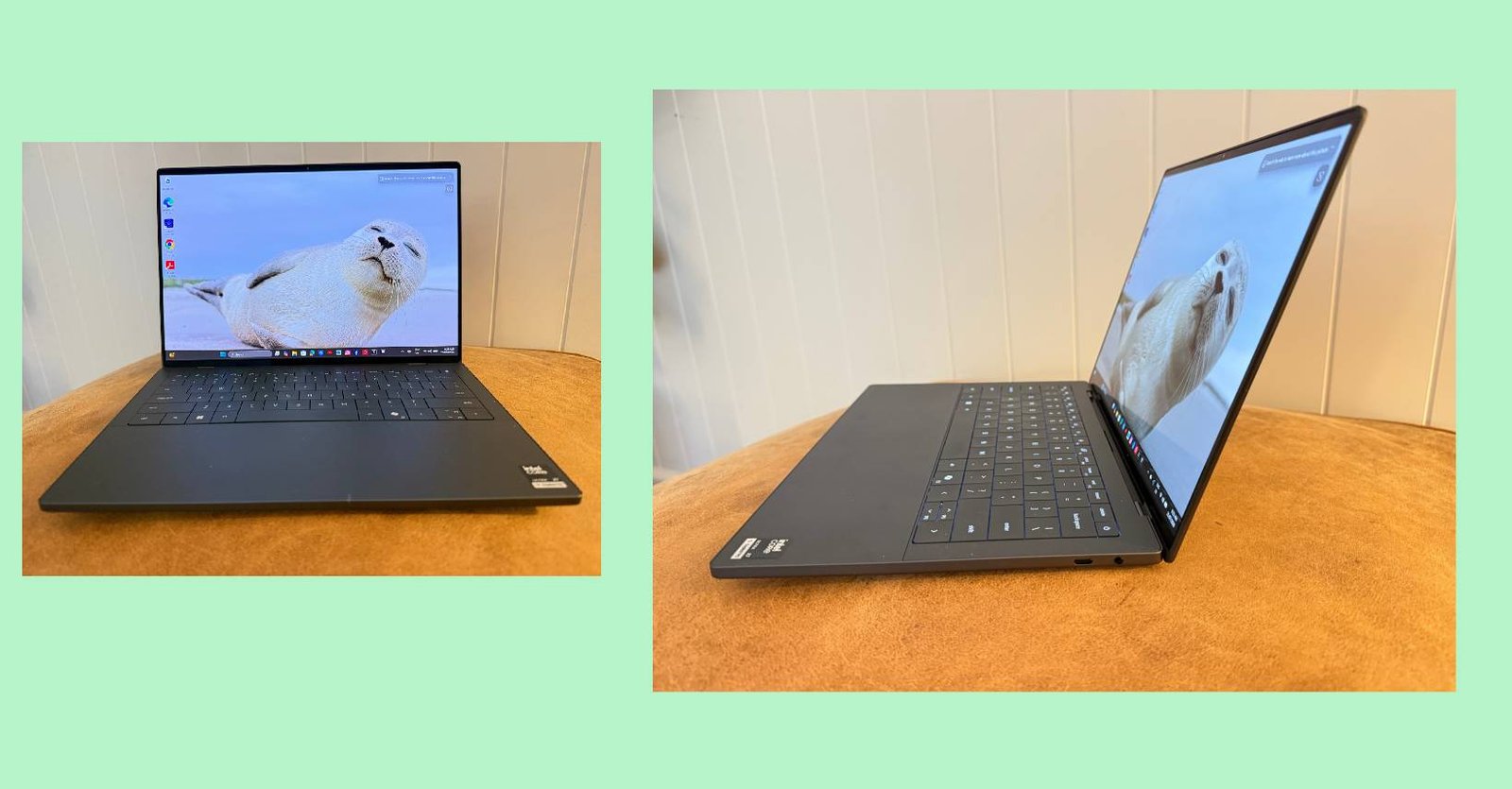
Armed with the latest Dell XPS 13, I walked onto the stage at Intel’s 2024 conference in Da Nang, Vietnam. I was there to talk about how powerful new hardware, combined with the emerging promise of AI, was starting to transform the way I worked and ran my business.
Much of the conversation centred on a new generation of chips, including NPUs and GPUs. The message was simple: to unlock AI’s full potential, you needed a computer with the hardware to match.
At the time, Copilot had only recently launched. Large language models were still in their infancy as mainstream business tools, and most people had barely heard of them, let alone worked out how to use them effectively.
I was certainly no universal AI expert. But I could see the potential for greater efficiency, productivity and creativity. And the promise to come was undeniably exciting.
Now, two years on, AI has moved from an emerging technology to an essential everyday business tool, reshaping how we write, create, research, communicate and run our companies.
The transformation has not been gradual. It has been explosive.
Today, as I work on the new Dell XPS 14, it’s almost dizzying to see just how far that promise has come. One thing hasn’t changed: to take advantage of this extraordinary new computing power, we still need the right hardware capable of keeping up with it.
When Copilot Was Still a Novelty
To demonstrate what an AI-ready computer could do, I was given the Dell XPS 13. It felt revolutionary.
Copilot had its own dedicated key on the keyboard, giving users immediate access to Microsoft’s new AI assistant — the first significant change to the Windows keyboard in nearly three decades.
Almost without many people really noticing, personal computing had made a bold new leap. Suddenly, buying a laptop was no longer simply about choosing the right screen size, storage capacity or processor speed. We had to start thinking about whether our computers could handle the emerging superpowers of AI.
Two years later, there’s nothing theoretical about the power of AI.
On a daily basis, I switch between Copilot, Claude and Gemini. I run my business through Microsoft 365, jump between multiple websites and publishing platforms, edit images and video, hold online meetings, write stories, manage documents and keep far too many browser tabs open at once.
Copilot has also developed considerably since my trip to Vietnam, with Microsoft steadily integrating its AI capabilities across the Microsoft 365 environment.
The Dell XPS 14 is without doubt built for this new reality.
The Dell XPS Returns
It has taken two years for Dell to deliver the follow-up to the XPS machine I reviewed in 2024, and the new 14-inch model is a considerable step forward.
My review unit came with a Series 3 Intel Core Ultra X7 358H processor, 32GB of RAM, a 1TB solid-state drive, Intel Arc B390 integrated graphics and a 14-inch 2.8K OLED touchscreen.
The Intel Core Ultra X7 358H is a 16-core processor capable of reaching up to 4.8GHz, with an NPU delivering up to 50 trillion operations per second for supported AI workloads and a GPU offering significantly more parallel processing capacity for graphics and video.
That is a lot of grunt inside an extraordinarily slim laptop.
It is worth pointing out that cloud-based AI platforms such as Claude, Gemini and many Copilot features still perform much of their heaviest processing in remote data centres. But your computer remains enormously important. It determines how smoothly you can move between AI platforms, Microsoft 365, video calls, browser windows and editing applications, and it powers compatible AI features that run locally on the device.
In my case, that working day can become very demanding very quickly.
Thankfully, this hasn’t intimidated the XPS 14.

A Screen Designed to Distract You
The display is one of the most instantly likeable features.
Colours are fabulously rich and vibrant, the blacks are deep, details are beautifully defined and movement is wonderfully smooth. Video, in particular, is a pleasure. The techie reasons for this are as follows: The 2.8K OLED touchscreen (2880 × 1800) supports Dolby Vision and refresh rates of up to 120Hz, dropping dynamically as low as 20Hz when that extra fluidity is not required, helping to balance visual performance with power consumption.
The ten-point touchscreen also makes it easy to move between windows and projects. I still use the keyboard and trackpad for most of my work, but touching the screen feels entirely natural when I am navigating a page, enlarging an image or jumping between applications. I’d go as far as to say it brings me closer to the computer.
Quite honestly, for all its productivity credentials, this computer can also be a magnificent time-waster. It is hard not to become mesmerised by the screensaver images of exotic, far-flung destinations. The profusion of colour, sharp imagery and unexpectedly cinematic sound can make a brief glance at the screen turn into several minutes of dreaming about where to travel next.
No doubt this is not the efficiency Dell had in mind.
The Design Is So Sleek, It Purrs
Dell is selling the XPS 14 partly on its portability, and with good reason. It starts at 1.36kg and measures approximately 14.62mm thick, making it easy to carry between home, the office, meetings and trips.
But describing it simply as light and thin undersells the experience. The graphite aluminium body looks sophisticated without being showy. It feels solid, superbly constructed and reassuringly expensive. The lines are clean, the profile is exceptionally slim and the whole design has a quiet confidence.
Dell has also listened to feedback about earlier XPS designs. The previous seamless trackpad looked stylish, but it was not always easy to see exactly where it began and ended. The new model adds subtle boundary markings, making the active area much clearer without disrupting the minimalist appearance — a small change, but a sensible one. Physical function keys have also returned, replacing the divisive touch-sensitive function row found on some earlier models.
Better Repairability Matters
Some of the most important improvements are not immediately visible. The XPS 14 includes modular USB-C ports and a keyboard that’s easier to remove, making repairs simpler and potentially extending the useful life of the device.
Dell has also used recycled steel in the hinges and recycled cobalt and copper in the battery, and the new XPS models meet the latest EPEAT 2.0 standards, reflecting a greater emphasis on circular design and repairability. Premium laptops should not only look good when they are taken out of the box. They should be designed to remain useful, repairable and desirable for years.
Three Ports — and Possibly Another Adapter
The XPS 14 provides three Thunderbolt 4 USB-C ports and a universal audio jack. The USB-C ports are versatile and can be used for charging, external displays and accessories. However, there is no traditional USB-A connection, HDMI port or built-in memory-card reader, so for many users that will mean carrying a hub or adapter.
It is not unusual for an ultra-thin laptop, but it remains one of the compromises involved in achieving such a slender design.
What About Battery Life?
Dell promotes battery life as another defining feature of the new XPS family. The company claims up to 31 hours of streaming battery life for some configurations using the lower-resolution 2K display. For a Core Ultra X7 model with 32GB of memory, 1TB of storage and the 2.8K OLED display, Dell’s published laboratory figure is up to 24 hours of streaming.
As always, streaming tests conducted under controlled conditions are not the same as a working day filled with video calls, editing, web browsing, AI tools and a bright OLED display.
A Premium Laptop With a Premium Price
At the time of writing, the Dell XPS 14 starts at $3,498 in Australia.
That is expensive. At this price, buyers should expect more than an attractive computer. They should expect powerful performance, an exceptional display, portability, excellent construction and a device capable of supporting the way they will work over the next several years.
The XPS 14 delivers that whole package.
The Verdict
Two years ago in Vietnam, I was being told that NPUs, GPUs and AI PCs were about to transform personal computing. The possibilities felt enormous but still slightly abstract. Few of us could have predicted how quickly AI tools would become part of everyday business life.
Today, I need a laptop that can move as quickly as I do — across numerous publications, multiple projects and several AI platforms, often all at once. The Dell XPS 14 packs the power required to do that into a machine that remains slim, light and exceptionally elegant.
Yes, its portability is impressive. But it is the complete package that makes the XPS 14 really sing: the powerful Intel processor, dedicated NPU, capable Arc graphics, generous memory, beautiful OLED touchscreen, refined trackpad and sheer pleasure of using it.
The AI PC has grown up.
And so has the Dell XPS.
More info here: Dell.com